I just had this weird need to self-host OSM for just internal use, not accessible from the Internet. These are notes on how to do it.
Source data
The easiest is to download an appropriate .osm.pbf1 file from https://download.geofabrik.de/ . Unfortunately they are not directly usable for (at least those I’ve found) web renderers.
Downloading other whole planet
Use planetiler in case you want to download some other regions or even the whole planet. It can generate mbtiles directly.
Converting pbf to mbtiles or pmtiles
The easiest way how to get mbtiles or pmtiles file is tilemaker :
docker run -it --rm -v $(pwd):/data ghcr.io/systemed/tilemaker:master /data/czech-republic-latest.osm.pbf --output /data/czech-republic-latest.mbtiles
What is the difference between mbtiles and pmtiles, you may ask? mbtiles format is based on SQLite and typically used by an application running on the same machine. pmtiles format is designed to be accessible via network, namely through HTTP range requests. This makes pmtiles super simple for hosting.
Downloading pmtiles directly
You can use bboxfinder to find coordinates for bounding box of interest. Protomaps have a handy utility go-pmtiles which can do operations directly on pmtiles and also to download selected bounding box from Protomaps’ server. You can verify available exports at https://maps.protomaps.com/builds/ .
pmtiles extract \
  https://build.protomaps.com/20260304.pmtiles \
  beroun.pmtiles \
  --bbox=49.763526,13.434906,50.299867,14.960632
I ran for just couple of seconds and downloaded created beroun.pmtiles file:
2026/03/04 18:00:29 extract.go:373: fetching 8 dirs, 8 chunks, 7 requests
2026/03/04 18:00:33 extract.go:413: Region tiles 9761, result tile entries 1149
2026/03/04 18:00:33 extract.go:422: fetching 1149 tiles, 68 chunks, 40 requests
fetching chunks 100% |████████████████████████████████████████████████████████████████████████████████████████████| (846/846 kB, 126 kB/s)
2026/03/04 18:00:41 extract.go:578: Completed in 15.695928026s with 4 download threads (73.20369912351369 tiles/s).
2026/03/04 18:00:41 extract.go:583: Extract required 50 total requests.
2026/03/04 18:00:41 extract.go:584: Extract transferred 866 kB (overfetch 0.05) for an archive size of 828 kB
Serving the map
OpenStreetMap Web App
It is possible to directly run OpenStreetMap Web . There is a docker compose which is a good starting point. It can also directly work with pbf data. Huge benefit is that all the metadata are kept and you can for example use search.
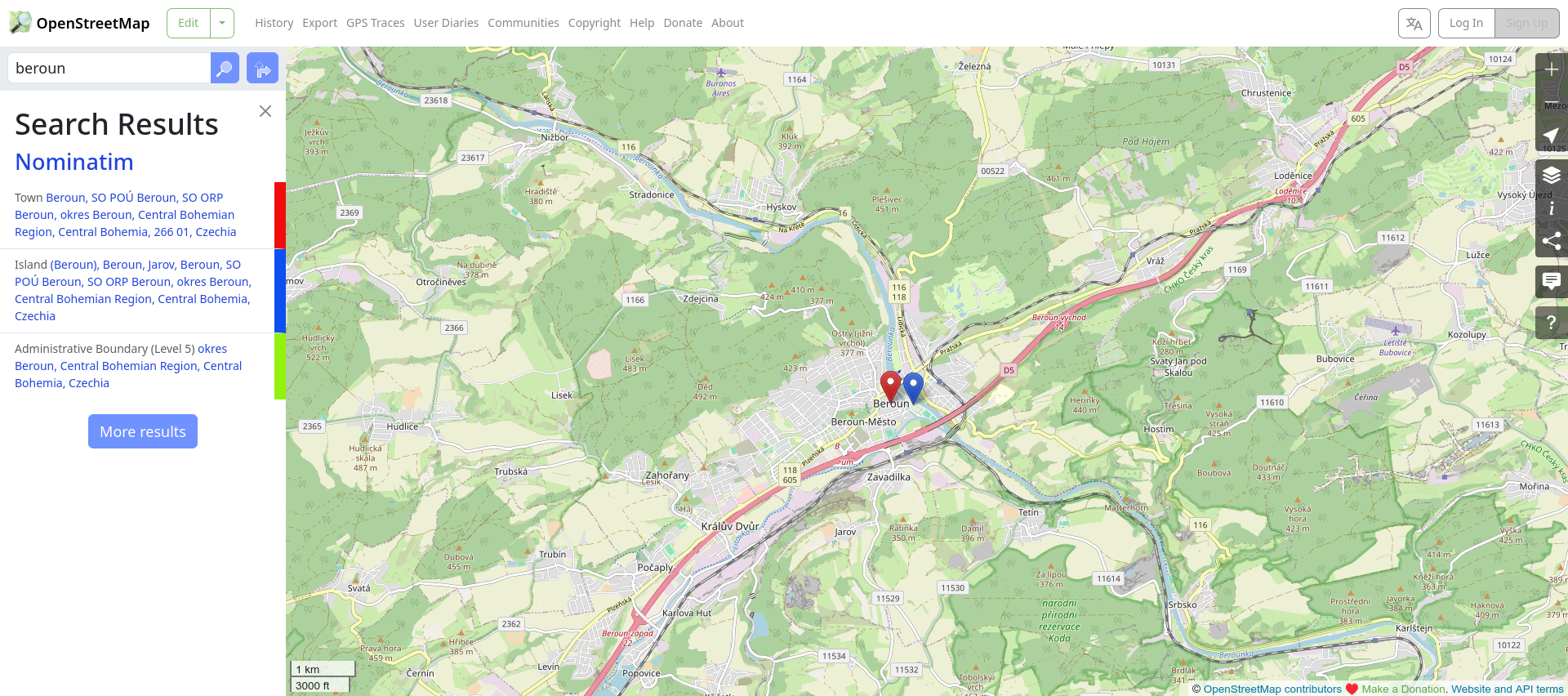
Running complete OSM web application. One can search for example.
Importing data is about running the following command, be aware that it will need a lot of time2.
docker compose -f docker-compose.yml run --rm web osmosis -verbose --read-pbf czech-republic-latest.osm.pbf --log-progress --write-apidb host="db" database="openstreetmap" user="openstreetmap" password="openstreetmap" validateSchemaVersion=no
It will work, but out of the box, the openstreetmap-website is going to use tile.openstreetmap.org for rendering raster (bitmap) tiles. This can definitely be changed in the configuration (see for example tile_cdn_url variable), but I have stopped pursuing this path at the end.
Raster Tile Server
Before abandoning the idea of using self-contained openstreetmap-website, I’ve explored raster tile servers. The easiest way seems to be overv/openstreetmap-tile-server . It is simple to run. But was not updated for 3y and more importantly was running quite slow for me.
Rendering and Serving mbtiles
maptiler/tilesserver-gl turned out to be simple and quick way to get mbtiles rendered. This is what I use at the moment.
Rendering and Serving pmtiles
Serving pmtiles files is super easy, as any webserver with support for Range is sufficient. There is https://pmtiles.io which can be used for viewing pmtiles, but rending is a bit odd (for example I cannot see street names).
Correct approach is going to be maplibre-gl-js and Americana , which I didn’t have time yet. Maybe next time :)
-
An
.osm.pbffile is a compact and efficient binary file format used for storing OpenStreetMap (OSM) data. It is based on Protocol Buffers and allow for direct access. ↩︎ -
Importing Czech Republic took more then 3 days in my case. And it is decent server (40cores, 400GB RAM)… But I’ve not done any postgres tuning. ↩︎